#FreeToPlay #6DOF #Controller
eteeConnect
eteeConnect is the accompanying software to your eteeControllers. Configure your eteeControllers to your preferences and keep them updated to the latest software and driver versions.
View game
Free
Mostly Positive · 35 reviews
71% positive (25 / 35)


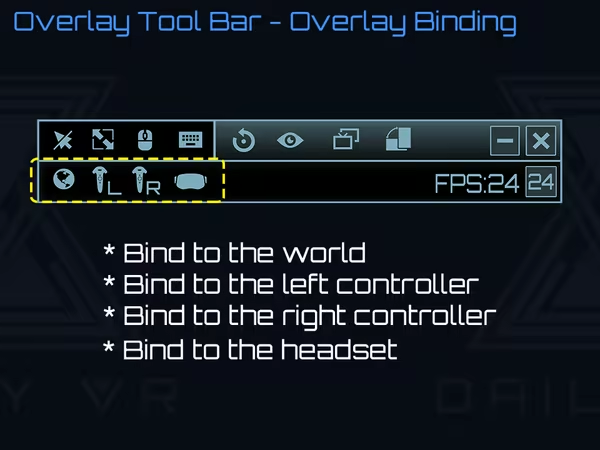
Daily OVR Free make you simply view and use your desktop apps in VR. You can adjust the position, size and transparency, bind desktop windows to controllers, HMD or the world, type with a VR keyboard, customize button settings, detect and display objects (ex: keyboard) by machine learning.
Released
March 16, 2020
Price
Platforms
Windows
Developer
Publisher
Last sync
September 25, 2026
Daily OVR Free is a free version of Daily OVR. It provides minimum essential overlay features. We think it would benefit a lot of VR users! :)
If you like Daily OVR Free and want to use advanced features, you can consider purchasing Daily OVR.
What is Daily OVR?
Do you want to use your desktop/window apps during VR gameplay? For example, you can play VRChat and see your Twitch chat window. Daily OVR is the best SteamVR Overlay(OVR) solution! And it supports Oculus, Vive/Viveport/Cosmos/MR(Mixed Reality)/Index!
Here is the beginner tutorial:
Differences between Free and Paid
_,.-''-.,__,.-''-.,__,. Features .,__,.-''-.,__,.-''-.,_
You have to download Android app: Daily OVR to enable "Mobile phone notification."
Scan the QR code below and download Daily OVR app on Google Play now!
_,.-''-.,__,.-''-.,__,. FAQ .,__,.-''-.,__,.-''-.,_
Daily OVR doesn't work in some games. For example, Elite dangerous, PokerStarVR ...etc
The issue is caused by Elite Dangerous tries to run in Oculus SDK mode, and Daily OVR doesn't support Oculus SDK. There is a workaround to force it to run in SteamVR mode, but it doesn't work every game (ED, PokerStarVR are OK). You may have controller issues. The possible problem is the game developer didn't think that users will forcibly use SteamVR to play the game; they didn't design the controller mapping correctly. You can search "daily ovr q&a" on Google to see the steps.
How many overlays can I open?
You can open up to 5 overlays. But it depends on your PC's performance. If performance is terrible, you could try:
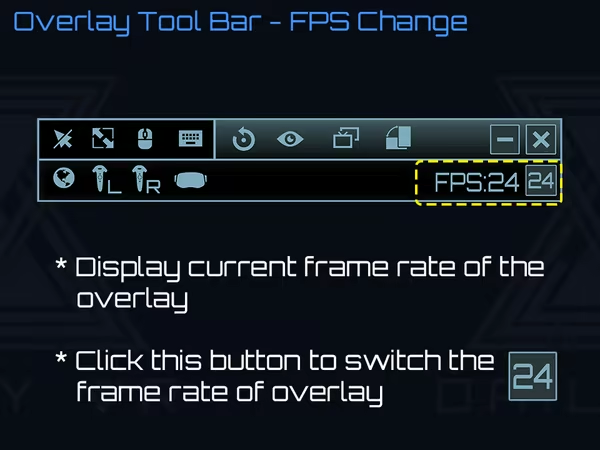
The button mappings of controllers are not good. Can I change it?
Daily OVR supports SteamVR 2.0 Input. You can customize button settings yourself.
I don't like the big icon/logo! Can I make it disappear?
Yes, you can hide the icon by long-pressing a button. See below: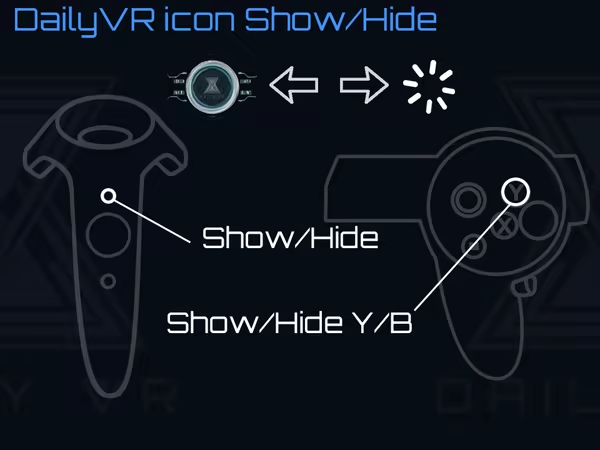
I cannot see/move my mouse pointer on some apps!
Some apps run as administrator permission. When Daily OVR doesn't run as the same permission, it cannot access to those apps.
You have to check "Run this program as an administrator" on DailyVRLauncher.exe Properties.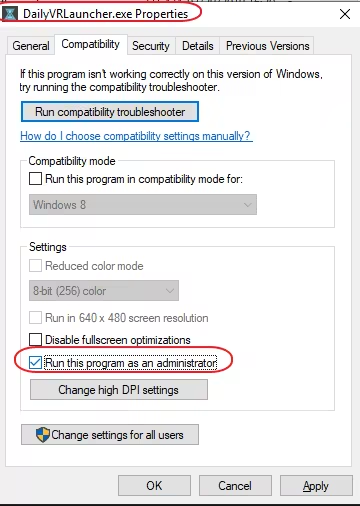
My Firefox screen is blank!
You have two options:
1. You have to disable the hardware acceleration of Firefox. See below: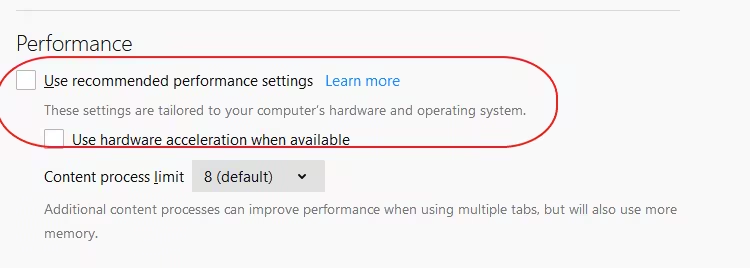
2. Use CustomApp instead
Join Daily OVR Discord and share your feedback with us!