
ViewTracker
No Reviews · 0 reviews
Link Hub
View on Steam→Screenshots

Description
Webcam head tracking for games
Released
September 13, 2018
Price
Platforms
Windows
Developer
John Kevin Corcoran
Publisher
John Kevin Corcoran
About
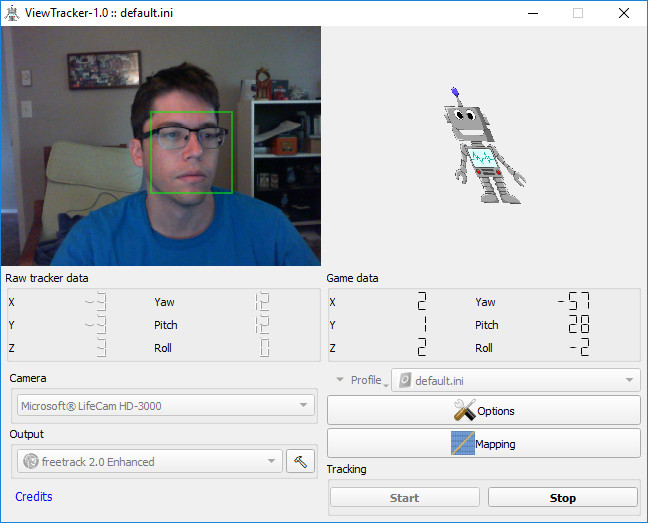
ViewTracker is a gaming utility that turns your webcam into a head tracking controller. Simply launch any supported game while ViewTracker is running and begin using the position of your head to change your view in-game. Enjoy stable and responsive head tracking with no hardware requirement other than a supported webcam.
Gamers have been using head tracking for years and many find it indispensable. It has proven to be especially suitable for simulator games such as flight sims or racing/vehicle sims. Using your head to change your view feels natural and allows you to keep your hands on the controls while looking around.
ViewTracker uses some of your computer’s resources to run the tracking, but care has been taken to minimize its impact on gaming performance. It doesn’t use graphics card resources and makes use of CPU resources that are often left unused when gaming on modern multi-core processors.
Most webcams should be compatible as long as they provide at least 30 FPS at at 640x480 resolution or above. It must have a 64-bit driver for Windows 10 and be DirectShow compatible.
Any game that has a head tracking option should be compatible with ViewTracker. Some games that are known to work:
- Aerofly FS2
- Assetto Corsa
- American Truck Simulator
- Arma II
- Arma III
- BeamNG.drive
- DCS: World
- Elite: Dangerous
- Euro Truck Simulator 2
- Farming Simulator 2017
- GRID
- IL-2 Sturmovik Battle of Stalingrad
- Kerbal Space Program
- Live for Speed
- MSFS 2020 & 2024
- Prepar3D v4
- Project Cars 2 (must launch in Steam VR mode)
- Star Citizen
- Train Simulator 2018
- War Thunder
- X-Plane 11 and 12
This list is not complete and more games will be added when it's verified that they work.